
Description
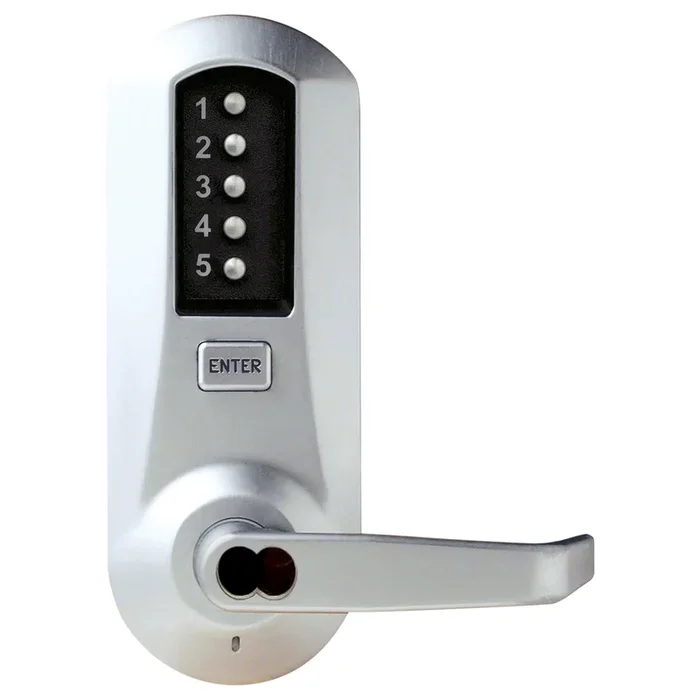
Dormakaba 5067SWL-26D-41 Pushbutton Lock
Simplex mechanical pushbutton locks offer a convenient way to control access between public and private areas. There are no keys or cards to manage, no computers to program, no batteries to replace, and combinations can be changed in seconds without removing the lock from the door.
- Fully Mechanical Lock Eliminates the Material and Labor Expense of Battery Replacements
- Single Access Code—One Easy-to-Manage Code for All Users
- Lock is Easily Programmed Via Keypad Without Removing Lock From the Door
- Vandal Resistant, Solid Metal Pushbuttons
- Extra Heavy-Duty, Solid Cast Housings, Solid Cast; ADA-Compliant Levers, and Wear Tested for Extensive Use in Indoor and Outdoor Applications
Attributes
Manufacturer surcharge: 7.0%
Base Material: Brass or Bronze
Cylinder Type: Schlage FSIC Less Core
Design: Winston Lever
Finish: 626/US26D
Finish : Satin Chrome
Function: Combination Entry
Grade: Grade 1
Lock Platform: Mortise Lock
Pack Height: 5″
Pack Length: 12″
Pack Qty: 1
Pack Width: 10.25″
Series: Simplex 5000 Series
Series Name: Simplex
Ship Weight: 11 lbs.
Strike: ASA Strike
Subtype: Pushbutton Lock
Type: Integrated and Pushbutton
Unit of Measure: Each
Resources
- CSI Specifications for Simplex 5000 Series Mechanical Pushbutton Locks
- CSI Specifications for Simplex 5000 Series Mechanical Pushbutton Locks
- CSI Specifications for Simplex 5000 Series Mechanical Pushbutton Locks
- Kaba Simplex Mechanical Pushbutton Lock – 5000 Series Exit Installation Instructions
- Kaba Simplex Mechanical Pushbutton Lock – 5000 Series Exit Installation Instructions
- Kaba Simplex Mechanical Pushbutton Lock – 5000 Series Exit Installation Instructions
- Kaba Simplex Mechanical Pushbutton Lock – 5000 Series Installation Instructions
- Kaba Simplex Mechanical Pushbutton Lock – 5000 Series Installation Instructions
- Kaba Simplex Mechanical Pushbutton Lock – 5000 Series Installation Instructions
- Simplex 5000 – How to Change the Combination (Exterior Combination Change)
- Simplex 5000 – How to Reset an Unknown Combination
- Simplex 5000 – How to change the combination (interior Combination Change)
- Simplex 5000 Series Cut Sheet
- Simplex Product Catalog
- Technical Specifications for Simplex 5000 Series Mechanical Pushbutton Locks
- Technical Specifications for Simplex 5000 Series Mechanical Pushbutton Locks
- Technical Specifications for Simplex 5000 Series Mechanical Pushbutton Locks

Reviews
There are no reviews yet.